mirror of
https://github.com/RT-Thread/rt-thread.git
synced 2026-03-23 19:08:51 +08:00

5.8 KiB
5.8 KiB
RK3500 BSP 介绍
中文页 | English
1. 介绍
产品细节
https://www.rock-chips.com/a/cn/product/RK35xilie/index.html
支持列表
| 驱动 | 支持情况 | Earlycon |
|---|---|---|
| RK3576 | 支持 | earlycon=uart8250,mmio32,0x2ad40000 |
| RK3588 | 支持 | earlycon=uart8250,mmio32,0xfeb50000 |
| RK3562 | - | - |
| RK3568J | 支持 | earlycon=uart8250,mmio32,0xfe660000 |
| RK3568 | 支持 | earlycon=uart8250,mmio32,0xfe660000 |
| RK3566 | 支持 | earlycon=uart8250,mmio32,0xfe660000 |
| RK3506 | - | - |
2. 编译
使用RT-Thread Smart 专用工具链进行编译:
wget https://github.com/RT-Thread/rt-thread/releases/download/v5.2.0/aarch64-linux-musleabi_for_x86_64-pc-linux-gnu_242520-979be38cba.tar.bz2

sudo tar -xf aarch64-linux-musleabi_for_x86_64-pc-linux-gnu_242520-979be38cba.tar.bz2  -C /opt
将工具链下载后,解压至/opt目录。并设置环境变量
环境变量配置为:
export RTT_CC="gcc"
export RTT_EXEC_PATH="/opt/aarch64-linux-musleabi_for_x86_64-pc-linux-gnu/bin/"
export RTT_CC_PREFIX="aarch64-linux-musleabi-"
export PATH="$RTT_EXEC_PATH:$PATH"
进入rt-thread/bsp/rockchip/rk3500目录下输入:
scons --menuconfig
选择并拉取zlib软件包

执行一下命令拉取软件包并编译
source  ~/.env/tools/scripts/pkgs --update

scons
3. 运行
RK3500 根据不同的板卡有不同的内核安装方法,建议安装到 SD 卡中,这里以Orange Pi Compute Module 4举例说明:
连接开发板串口:

-
打开串口工具,选择对应串口,设置波特率为1500000
-
将上述生成好的rtthread.bin放置sd卡中
-
开发板上电,键盘点击
ctrl + c进入uboot命令行模式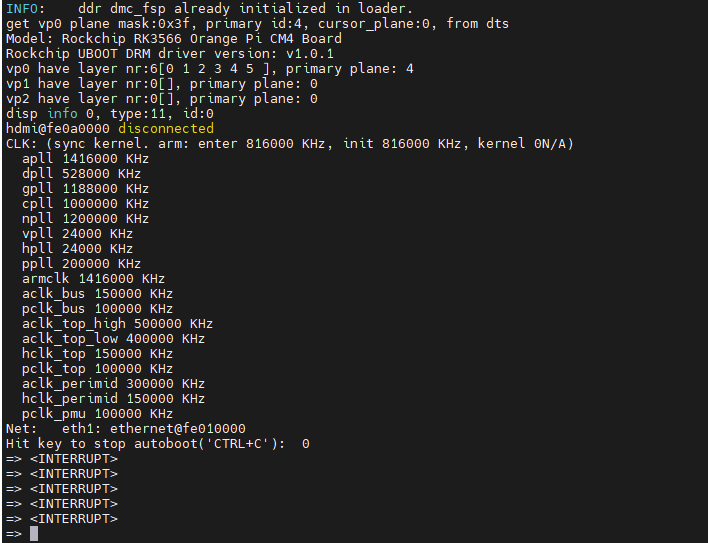
-
输入下述指令运行smart系统

fatload mmc 1:1 0x480000 rtthread.bin;booti 0x480000 - 0x8300000
reading rtthread.bin
1188080 bytes read in 102 ms (11.1 MiB/s)
Fdt Ramdisk skip relocation
## Flattened Device Tree blob at 0x08300000
   Booting using the fdt blob at 0x08300000
  'reserved-memory' linux,cma: addr=10000000 size=800000
  'reserved-memory' ramoops@110000: addr=110000 size=f0000
   Using Device Tree in place at 0000000008300000, end 000000000832048e
Adding bank: 0x00200000 - 0x08400000 (size: 0x08200000)
Adding bank: 0x09400000 - 0xf0000000 (size: 0xe6c00000)
Adding bank: 0x1f0000000 - 0x200000000 (size: 0x10000000)
== DO RELOCATE == Kernel from 0x00280000 to 0x00480000
Total: 107148.892 ms

Starting kernel ...

[I/rtdm.ofw] Booting RT-Thread on physical CPU 0x0
[I/rtdm.ofw] Machine model: Rockchip RK3566 Orange Pi CM4 Board
[I/rtdm.ofw] Earlycon: uart8250 at MMIO/PIO 0x00000000fe660000 (options '')
[I/rtdm.ofw] Memory node(1) ranges: 0x0000000000200000 - 0x0000000008400000
[I/rtdm.ofw] Memory node(1) ranges: 0x0000000009400000 - 0x00000000f0000000
[I/rtdm.ofw] Memory node(1) ranges: 0x00000001f0000000 - 0x0000000200000000
[I/mm.memblock] System memory:
[I/mm.memblock]            [0x0000000000200000, 0x0000000008400000]
[I/mm.memblock]            [0x0000000009400000, 0x00000000f0000000]
[I/mm.memblock]            [0x00000001f0000000, 0x0000000200000000]
[I/mm.memblock] Reserved memory:
[I/mm.memblock]            [0x0000000000110000, 0x0000000000200000]
[I/mm.memblock]            [0x0000000000480000, 0x00000000006c7000]
[I/mm.memblock]            [0x00000000006c7000, 0x00000000046c7000]
[I/mm.memblock]            [0x00000000046c7000, 0x00000000048c7000]
[I/mm.memblock]            [0x00000000048c7000, 0x00000000048e5000]
[I/mm.memblock]            [0x0000000008300000, 0x000000000831e000]
[I/mm.memblock]            [0x0000000010000000, 0x0000000010800000]
[I/mm.memblock]            [0x00000000edf00000, 0x00000000ee367400]
[I/mm.memblock]            [0x00000000eff00000, 0x00000000eff08000]
[I/mm.memblock] physical memory region [0x0000000000200000-0x0000000000480000] installed to system page
[I/mm.memblock] physical memory region [0x00000000048e5000-0x0000000008300000] installed to system page
[I/mm.memblock] physical memory region [0x000000000831e000-0x0000000008400000] installed to system page
[I/mm.memblock] physical memory region [0x0000000009400000-0x0000000010000000] installed to system page
[I/mm.memblock] physical memory region [0x0000000010800000-0x00000000edf00000] installed to system page
[I/mm.memblock] physical memory region [0x00000000ee368000-0x00000000eff00000] installed to system page
[I/mm.memblock] physical memory region [0x00000000eff08000-0x00000000f0000000] installed to system page
[I/mm.memblock] physical memory region [0x00000001f0000000-0x0000000200000000] installed to system page
[I/mm.memblock] 4191 MB memory installed to system page
[I/osi.psci] Using PSCI v1.1 Function IDs
[I/clk.rk3568] set cpu_freq to 1800000000
[I/rtdm.ofw] Console: uart0 (fiq-debugger)

 \ | /
- RT -     Thread Smart Operating System
 / | \     5.2.1 build Apr 28 2025 09:19:08
 2006 - 2024 Copyright by RT-Thread team
lwIP-2.1.2 initialized!
[I/sal.skt] Socket Abstraction Layer initialize success.
[I/utest] utest is initialize success.
[I/utest] total utest testcase num: (5)
[I/drivers.serial] Using /dev/ttyS0 as default console
Press any key to stop init process startup ... 3
Press any key to stop init process startup ... 2
Press any key to stop init process startup ... 1
Starting init ...
[I/rtdm.mnt] File system initialization done
Hi, this is RT-Thread!!
msh />I/TC: Secondary CPU 1 initializing
I/TC: Secondary CPU 1 switching to normal world boot
[I/cpu.aa64] Call cpu 1 on success
I/TC: Secondary CPU 3 initializing
I/TC: Secondary CPU 3 switching to normal world boot
I/TC: Secondary CPU 2 initializing
I/TC: Secondary CPU 2 switching to normal world boot
[I/cpu.aa64] Call cpu 3 on success
[I/cpu.aa64] Call cpu 2 on success

msh />
msh />