

17 KiB
Android移动安全第三章_Binder服务安全
QIANXIN Team 来源:https://forum.butian.net/share/4831
系列目录:
- Android 组件导出安全
- Android Intent 安全
- Android Binder 服务安全(本章)
- Android ContentProvider 安全
- Android WebView 安全
- Android UI 欺骗与钓鱼
- Android Deep Link 安全
- Android 广播安全
- Android PendingIntent 安全
- Android 系统设置安全
- Android SSRF 与网络安全
- Android 加密与数据存储安全
- Android 认证与证书校验
- Android Zip Slip 路径遍历
- Android Fragment Injection
- Android SELinux 与沙箱机制
1. 前言
Android 是一个多进程系统。每个 App 运行在自己的进程中,系统服务运行在 system_server 进程中。system_server 是 Android 中权限最高的用户态进程(UID 1000),ActivityManagerService、PackageManagerService 等系统服务都在这个进程里。进程之间的内存是隔离的,不能直接访问彼此的数据。
那 App 怎么调用系统功能?比如安装应用、获取位置、读取通知?答案是 Binder。
Binder 是 Android 的跨进程通信(IPC)机制。它不是 Linux 原生的,而是 Android 在内核中加入的一个驱动(/dev/binder),专门为 Android 的安全模型设计。App 想调用系统服务,就通过 Binder 发起一次跨进程调用,内核负责把请求从调用方进程传递到服务方进程,同时携带调用者的 UID(User ID,Android 为每个 App 分配的唯一用户标识)和 PID(Process ID,进程标识)信息。
从安全角度看,Binder 有两个特性:
- 调用者身份不可伪造。UID 和 PID 由内核填入,应用层无法篡改
- 权限检查是服务端的责任。内核只负责传递身份信息,检不检查、怎么检查,完全由服务端代码决定
第一个特性是安全的基础,第二个特性是漏洞的来源。如果服务端忘了检查调用者身份,任何 App 都能调用它的方法。
2. Binder 通信机制
2.1 整体架构
Binder 通信涉及四个角色:
| 角色 | 说明 | 典型实例 |
|---|---|---|
| Client | 发起调用的一方 | 普通 App |
| Server | 提供服务的一方 | system_server 中的系统服务 |
| ServiceManager | 服务注册表,负责服务的注册和查找 | servicemanager 进程 |
| Binder 驱动 | 内核模块,负责跨进程数据传输 | /dev/binder |
一次典型的调用流程如下图所示:
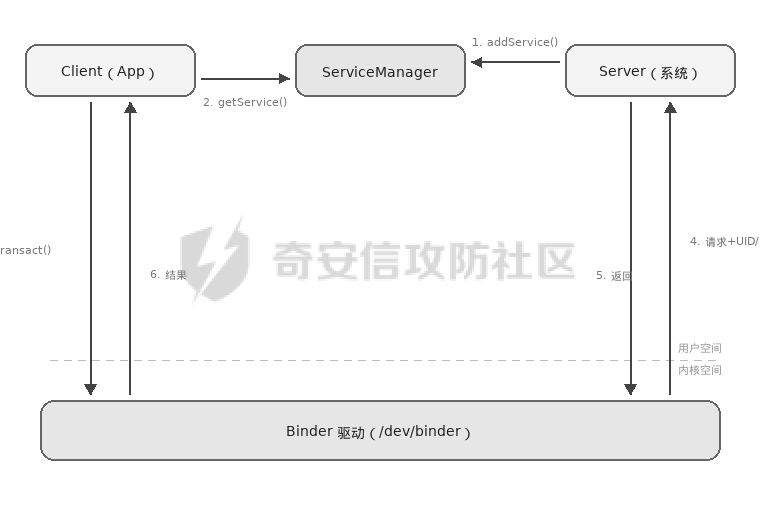
- Server 启动时,通过
ServiceManager.addService()注册服务 - Client 通过
ServiceManager.getService()获取服务的 Binder 代理对象 - Client 调用代理对象的方法,Binder 驱动将请求(包括方法编号、参数、调用者 UID/PID)传递给 Server
- Server 处理请求并返回结果,Binder 驱动将结果传回 Client
ServiceManager 本身也是一个 Binder 服务,但它的 handle 固定为 0,所有进程都能直接访问。它相当于一个电话簿——不需要知道系统服务的进程地址,只需要知道服务名,就能通过 ServiceManager 查到对应的 Binder 引用。
2.2 AIDL 与 transaction code
开发者通常不直接操作 Binder 驱动,而是通过 AIDL(Android Interface Definition Language,Android 接口定义语言)定义跨进程调用的接口。AIDL 类似于定义一个远程可调用的 Java 接口,编译器会自动生成两部分代码:Stub(服务端骨架,负责接收和分发请求)和 Proxy(客户端代理,负责封装和发送请求)。
一个简单的 AIDL 接口:
// IDeviceManager.aidl
interface IDeviceManager {
    String getDeviceId();          // transaction code = 1
    void setDeviceName(String n);  // transaction code = 2
    boolean resetDevice();         // transaction code = 3
}
每个方法会被分配一个 transaction code(事务码),从 FIRST_CALL_TRANSACTION(值为 1)开始递增。Client 调用方法时,实际上是向 Binder 驱动发送一个包含 transaction code 和序列化参数的数据包。
这意味着即使没有 AIDL 文件,只要知道 transaction code 和参数格式,就可以通过 service call 命令直接调用服务方法:
adb shell service call clipboard 1
2.3 Parcel:数据序列化
Binder 传输的数据通过 Parcel(包裹)对象序列化。Parcel 是一个二进制缓冲区,数据按顺序写入和读取:
Parcel data = Parcel.obtain();
data.writeInterfaceToken("com.example.IDeviceManager");
data.writeString("new_device_name");
mRemote.transact(2, data, reply, 0);


@Override
public boolean onTransact(int code, Parcel data, Parcel reply, int flags) {
    switch (code) {
        case 2: {
            data.enforceInterface("com.example.IDeviceManager");
            String name = data.readString();
            this.setDeviceName(name);
            reply.writeNoException();
            return true;
        }
    }
    return super.onTransact(code, data, reply, flags);
}
enforceInterface() 会校验接口描述符是否匹配,防止把发给 A 服务的请求误发给 B 服务。但它不是安全检查——不会验证调用者身份。
3. 系统服务的注册与发现
3.1 AOSP 原生服务
Android 系统自带大量 Binder 服务,运行在 system_server 进程中。通过 service list 可以查看当前设备上所有注册的服务:
adb shell service list
输出(节选):
Found 287 services:
0  sip: [android.net.sip.ISipService]
1  phone: [com.android.internal.telephony.ITelephony]
2  isms: [com.android.internal.telephony.ISms]
...
50 activity: [android.app.IActivityManager]
51 package: [android.content.pm.IPackageManager]
52 clipboard: [android.content.IClipboard]
...
方括号中的是 AIDL 接口名,前面的字符串是服务名,也就是 getService() 的参数。
3.2 厂商自定义服务
厂商定制 ROM 会在 AOSP(Android Open Source Project,Android 开源项目)基础上添加自己的系统服务。这些服务通常以厂商前缀命名:
adb shell service list | grep -i "miui\|xiaomi"
可能看到类似:
miui.mqsas.IMQSNative
miui.security.ISecurityManager
xiaomi.IGameBoosterService
这些服务和 AOSP 原生服务一样运行在 system_server 中,拥有系统级权限。但它们不在 AOSP 的代码审查范围内,安全质量参差不齐。
3.3 服务注册方式
系统服务的注册通常在 system_server 启动过程中完成:
ServiceManager.addService("device_manager", new DeviceManagerService(context));
注册后,任何进程都可以通过 ServiceManager 获取该服务的 Binder 代理:
IBinder binder = ServiceManager.getService("device_manager");
IDeviceManager manager = IDeviceManager.Stub.asInterface(binder);
manager.getDeviceId();
这里没有任何权限检查。ServiceManager.getService() 对所有进程开放,获取 Binder 代理不需要任何权限。安全检查只能发生在服务端的方法实现中。
4. 权限检查机制
4.1 调用者身份获取
Binder 驱动在传递调用请求时,会在内核层面记录调用者的 UID 和 PID。服务端通过以下 API 获取:
int callingUid = Binder.getCallingUid();
int callingPid = Binder.getCallingPid();
这两个值由内核填入,应用层无法伪造。
但有一个容易踩坑的地方:Binder.getCallingUid() 返回的是最近一次 Binder 调用的调用者 UID。如果服务端在处理请求的过程中又发起了另一个 Binder 调用(比如调用另一个系统服务),那么 getCallingUid() 的返回值会被覆盖为当前进程自己的 UID。
为了解决这个问题,Android 提供了 clearCallingIdentity() 和 restoreCallingIdentity():
@Override
public void sensitiveMethod() {

    int callingUid = Binder.getCallingUid();


    if (checkPermission(callingUid) != GRANTED) {
        throw new SecurityException("Permission denied");
    }


    long token = Binder.clearCallingIdentity();
    try {

        doInternalWork();
    } finally {

        Binder.restoreCallingIdentity(token);
    }
}
如果开发者在检查权限之前就调用了 clearCallingIdentity(),那 getCallingUid() 返回的就是 system_server 自己的 UID(1000),权限检查就形同虚设了。
4.2 常见的权限检查方式
context.enforceCallingPermission(
    "android.permission.MANAGE_USERS",
    "Caller must hold MANAGE_USERS permission"
);


int uid = Binder.getCallingUid();
if (uid >= Process.FIRST_APPLICATION_UID) {
    throw new SecurityException("System only");
}


int uid = Binder.getCallingUid();
String[] packages = context.getPackageManager().getPackagesForUid(uid);
if (!Arrays.asList(packages).contains("com.android.settings")) {
    throw new SecurityException("Only Settings app allowed");
}


PackageInfo info = pm.getPackageInfo(callingPackage, PackageManager.GET_SIGNATURES);
4.3 缺失权限检查的后果
如果一个系统服务的方法没有做任何权限检查:
public class VulnSystemService extends IVulnService.Stub {
    @Override
    public String readSystemConfig(String path) {


        return FileUtils.readFileToString(new File(path));
    }
}
任何第三方 App 都可以调用这个方法,以 system_server 的权限读取系统文件。这就是一个权限提升漏洞——普通 App 通过未授权的 Binder 调用获得了系统级文件读取能力。
5. 攻击面分析
5.1 未授权方法调用
这是 Binder 服务最常见的漏洞类型。服务注册到 ServiceManager 后,所有 App 都能获取其代理对象。如果某个方法内部没有权限检查,就是一个可利用的攻击点。
通过 service call 可以直接测试:
adb shell service call clipboard 1


adb shell service call miui.security 1
如果返回了正常数据而不是 SecurityException,说明该方法可能缺少权限检查。
service call 直接操作 Parcel 层,需要知道参数的精确格式。对于复杂参数(嵌套对象、数组等),手动构造 Parcel 数据比较困难。另一种方式是通过 Java 反射调用:
IBinder binder = (IBinder) Class.forName("android.os.ServiceManager")
    .getMethod("getService", String.class)
    .invoke(null, "target_service");


Class<?> stubClass = Class.forName("com.vendor.ITargetService$Stub");
Object service = stubClass.getMethod("asInterface", IBinder.class)
    .invoke(null, binder);


Method method = service.getClass().getMethod("sensitiveMethod", String.class);
Object result = method.invoke(service, "parameter");
也可以不依赖 AIDL 接口,直接构造 Parcel 数据发送:
Parcel data = Parcel.obtain();
Parcel reply = Parcel.obtain();
try {
    data.writeInterfaceToken("android.content.IClipboard");
    data.writeString("com.test.app");
    binder.transact(2, data, reply, 0);
    reply.readException();

} finally {
    data.recycle();
    reply.recycle();
}
5.2 transaction code 枚举
如果没有 AIDL 文件,可以通过枚举 transaction code 来探测服务暴露了哪些方法:
for i in $(seq 1 20); do
    echo "--- code $i ---"
    adb shell service call target_service $i
done
返回值的含义:
| 返回 | 含义 |
|---|---|
| Result: Parcel(...) 有数据 | 方法存在且执行成功 |
| Result: Parcel(00000000 ...) 全零 | 方法存在,返回空或 void |
| 异常信息 | 方法存在但权限不足或参数错误 |
| Failed transaction | 该 transaction code 不存在 |
配合反编译服务端代码(从 framework JAR 或 system APK 中提取),可以还原出每个 transaction code 对应的方法名和参数类型。
5.3 Binder 代理泄露
有些场景下,系统服务会通过回调把内部 Binder 对象传递出来。如果这个 Binder 对象本不应该暴露给第三方 App,就构成了代理泄露。
public void registerCallback(ICallback callback) {

    callback.onReady(mInternalManager.asBinder());
}
攻击者注册回调后,就获得了 mInternalManager 的 Binder 代理,可以直接调用它的方法,绕过了正常的访问路径。
5.4 Parcel 反序列化漏洞
Binder 传输的数据通过 Parcel 序列化。如果服务端在反序列化时处理不当,可能导致安全问题。
Android 中的 Bundle(一种键值对容器,常用于 Intent extras 和 Binder 调用参数)有一个特性叫延迟反序列化(lazy unmarshalling)——Bundle 收到 Parcel 数据后不会立即解析所有内容,而是在第一次 get 操作时才真正反序列化:
@Override
public boolean onTransact(int code, Parcel data, Parcel reply, int flags) {
    Bundle bundle = data.readBundle();

    String value = bundle.getString("key");


}
这个特性曾经是多个 Android 提权漏洞的根源。攻击者在 Bundle 中放入精心构造的 Parcelable 对象,当系统服务反序列化时触发类型混淆(写入时是 A 类型,读取时被解释为 B 类型),最终实现权限提升。CVE-2017-13288 等 "Bundle 风水" 系列漏洞就属于这一类。
5.5 dumpsys 信息泄露
dumpsys 命令可以获取系统服务的内部状态信息:
adb shell dumpsys <服务名>


adb shell dumpsys activity activities


adb shell dumpsys package com.target.app
不是所有服务都支持 dump,dump 输出的内容由服务端的 dump() 方法决定。有些服务的 dump 会输出 token、session 信息、内部状态等敏感数据,这本身也可能是一个信息泄露点。
6. 版本演进
6.1 SELinux 对 Binder 的限制
从 Android 5.0 开始,SELinux(Security-Enhanced Linux,一种内核级的强制访问控制机制,在标准的 Linux 权限模型之上增加了一层策略控制)被设为强制模式。SELinux 策略可以限制哪些进程能与哪些 Binder 服务通信:
allow platform_app clipboard_service:service_manager find;


neverallow untrusted_app vendor_custom_service:service_manager find;
即使服务端代码没有权限检查,SELinux 也可能在更底层阻止调用。但 SELinux 策略的覆盖范围取决于厂商的配置——有些厂商自定义服务可能没有被 SELinux 策略覆盖到。
6.2 Treble 架构与 Binder 域分离
Android 8.0 引入了 Treble 架构,将 Binder 分成了三个独立的域:
/dev/binder:framework 进程之间的通信(App ↔ system_server)/dev/hwbinder:framework 与 HAL(Hardware Abstraction Layer,硬件抽象层,负责连接 Android 框架和底层硬件驱动)之间的通信/dev/vndbinder:vendor(厂商)进程之间的通信
Android 10 进一步引入了 /dev/vndbinder,隔离 vendor 和 framework 的 Binder 通信。这种分离减少了跨域攻击的可能性——第三方 App 只能访问 /dev/binder 上的服务,无法直接与 HAL 服务通信。
6.3 隐藏 API 限制
从 Android 9 开始,Google 限制了对隐藏 API(标记为 @hide 的系统 API,不在公开 SDK 中)的反射调用。ServiceManager 本身就是隐藏 API,直接反射调用会收到警告或被阻止:
Accessing hidden method Landroid/os/ServiceManager;->getService(Ljava/lang/String;)Landroid/os/IBinder; (greylist, reflection, allowed)
Android 对隐藏 API 按限制力度分了几个级别:
| 列表 | 限制 |
|---|---|
| whitelist | 无限制 |
| greylist | 允许但会打印警告 |
| greylist-max-o | targetSdk > 26 时阻止 |
| greylist-max-p | targetSdk > 28 时阻止 |
| blacklist | 完全阻止 |
但这个限制可以被绕过(双重反射、JNI 调用等),所以它增加了攻击成本,但不构成安全边界。
6.4 版本变化汇总
| 版本 | 变化 |
|---|---|
| Android 5.0 | SELinux 强制模式,Binder 调用受策略约束 |
| Android 8.0 | Treble 架构,HAL 服务使用独立的 /dev/hwbinder |
| Android 9 | 隐藏 API 限制,反射调用 ServiceManager 受到约束 |
| Android 10 | /dev/vndbinder 隔离 vendor 和 framework 通信 |
| Android 11+ | Stable AIDL 用于跨分区接口,增强接口稳定性 |
7. 总结
Binder 是 Android IPC 的底层实现,所有系统服务都建立在它之上。
回顾一下:
- Binder 驱动在内核层记录调用者 UID/PID,身份不可伪造,但权限检查是服务端的责任
- ServiceManager 是公开的服务注册表,任何 App 都能查询和获取服务代理
- 厂商自定义系统服务运行在 system_server 中拥有系统权限,但不在 AOSP 的审查范围内
service call和反射调用是与 Binder 服务交互的两种方式- SELinux、Treble 架构、隐藏 API 限制是系统层面的缓解措施,但都有各自的局限
下一章讲 Android ContentProvider 安全。ContentProvider 是四大组件中专门负责数据共享的,它的 query、openFile、call 方法各有不同的攻击面,SQL 注入和路径遍历是其中比较经典的漏洞模式。